How do I set up SRAM AXS Gearing and Buttons?
Cadence connects straight to your SRAM AXS rear derailleur over Bluetooth. Once it’s connected, Cadence shows your current gear, saves every shift with your activity, and lets your Blips and hood (Bonus) buttons control Cadence.
Your shifters, Blips and front derailleur all talk to Cadence through the rear derailleur, so it’s the only part you add in Cadence.
SRAM AXS gearing is part of Cadence Pro. SRAM AXS buttons are part of Cadence Elite.
Free your buttons in the SRAM AXS app
Cadence only uses buttons that aren’t set to do anything in the SRAM AXS app. A button that shifts keeps shifting, and Cadence ignores it, so a shift never starts, pauses or laps your activity by accident.
SRAM sets the hood (Bonus) buttons on Force and Red levers to shift by default, so they need this step before they work in Cadence. Rival levers don’t have hood buttons.
To free a button, open the SRAM AXS app, connect to your bike, and go to “Configure Controls”:
- Set each Wireless Blip you want to use in Cadence to “Unassigned”.
- Set each hood (Bonus) button you want to use to “Unassigned”.
- To use both Blips pressed together, also set the Wireless Blips’ combination to “Unassigned”.
- To use both hood buttons pressed together, set “Bonus (L+R)” under “Combination Actions” to “Unassigned”.
When you’re done, fully close the SRAM AXS app. Your derailleur can only talk to one app at a time.
Connect your derailleur in Cadence
- Wake your bike by pressing a shifter or giving it a little bounce. AXS parts go to sleep when the bike sits still.
- Open Cadence and go to Settings > Bluetooth Sensors > Add New Sensor.
- Select your rear derailleur. It shows up as “SRAM” followed by its serial number.
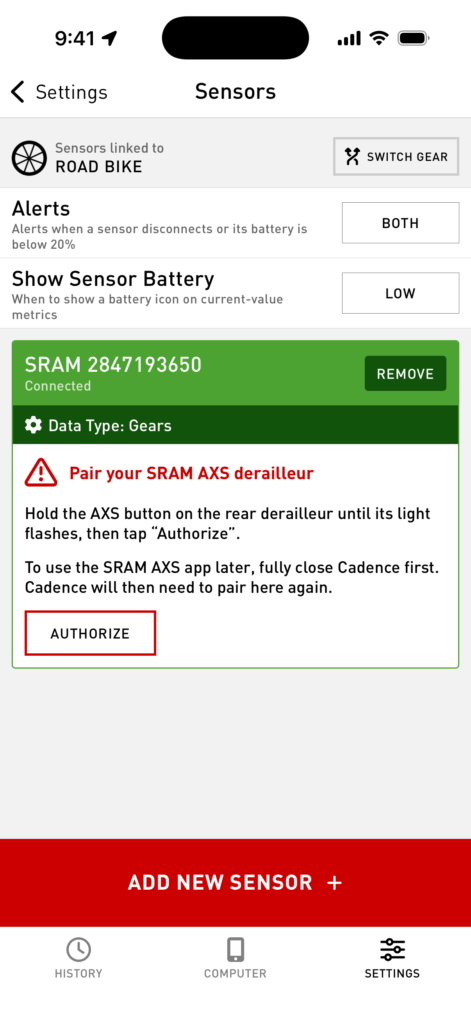
- Cadence asks you to pair. Hold the AXS button on the rear derailleur until its light flashes, then tap “Authorize”.
If you tap “Authorize” too early, Cadence tells you the light isn’t flashing yet. Keep holding the AXS button until it flashes, then tap “Authorize” again. If Cadence says “Pairing didn’t finish”, hold the AXS button again until it flashes and tap “Authorize”.
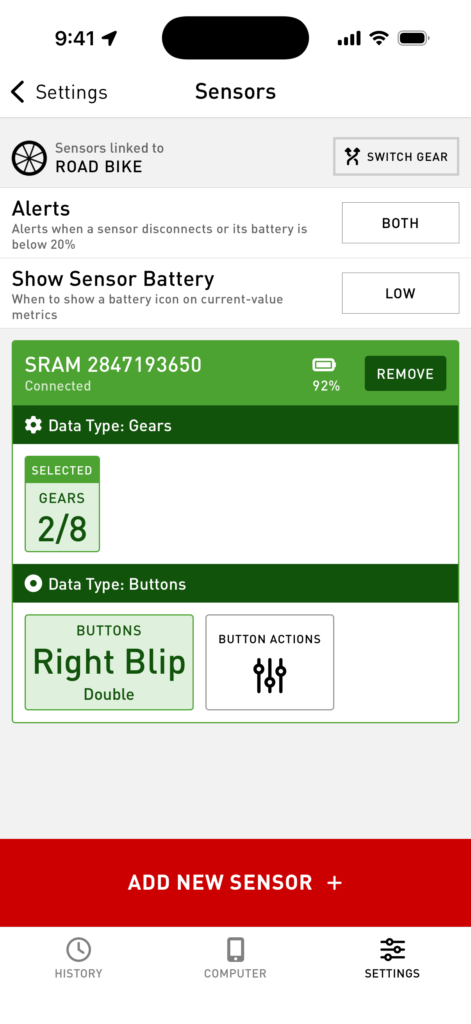
Once it’s paired, the derailleur’s section on the Bluetooth Sensors screen shows your current gear (front/rear, like 2/8) and the last button you pressed, and whether it was a single or double press. Press each button you freed to check that it shows up here.
You only need to pair once. Cadence remembers your derailleur and connects to it on its own from then on.
Using the SRAM AXS app later
While Cadence is connected to your derailleur, the SRAM AXS app can’t connect to it. To use the SRAM AXS app, for example to change a button or update firmware, fully close Cadence first.
The SRAM AXS app and Cadence each need their own pairing. After you use the SRAM AXS app, Cadence shows the pairing card again: hold the AXS button until its light flashes and tap “Authorize”. The SRAM AXS app asks for the same thing the next time you open it after Cadence.
Choose what each button does
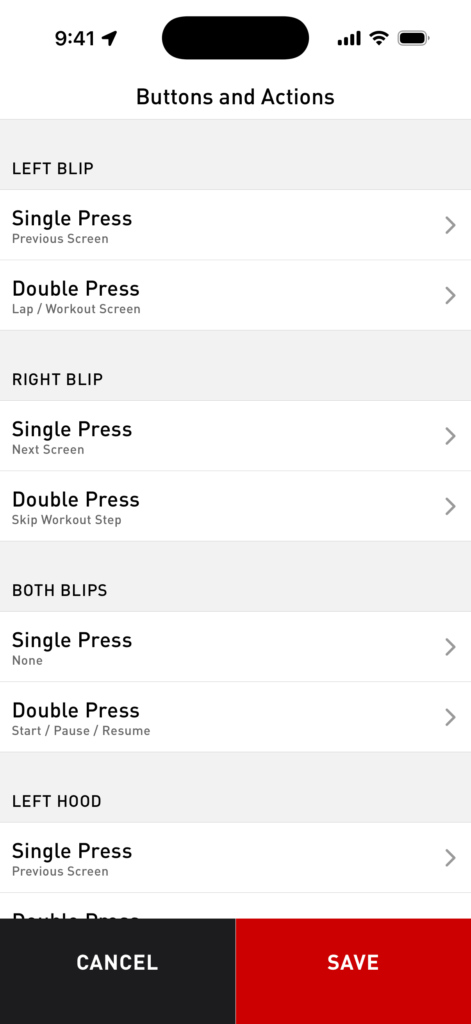
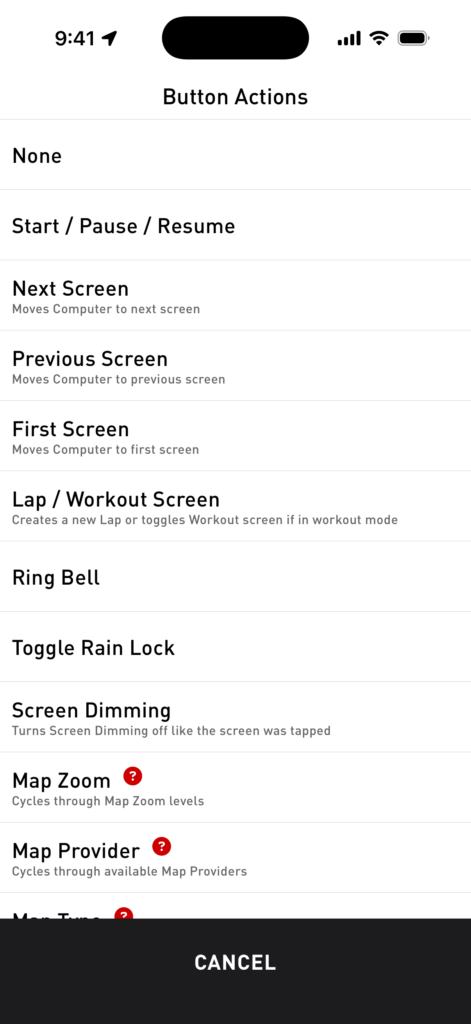
Tap “Button Actions” to pick what each button does. Every button has a single press and a double press, and each one can run a different action: start, pause and resume, change screens, add a lap, ring a bell, rain lock, map zoom, workout steps, and more.
Show your gear on the Computer screen
Add the “Gearing: Current” field to a screen in Settings > Screen Layouts. Its settings let you choose:
- Show Gearing: front and rear, front only, or rear only.
- Gear Display: the gear number, the teeth (like 48×15), or the gear ratio (like 3.20).
To show teeth or a ratio, tell Cadence what’s on your bike. Go to Settings > Gear, pick your bike, and set its Chainrings and Cassette. There are presets for SRAM road, XPLR and Eagle setups, or choose Custom to enter your own.
After your activity, Activity Details shows a Gearing section with your shifts, most used gear, time in each gear, and a chart of every shift.
Troubleshooting
A button still shifts, or its press doesn’t show up on the Bluetooth Sensors screen. It’s still assigned in the SRAM AXS app. Fully close Cadence, set the button to “Unassigned” in the SRAM AXS app, fully close the SRAM AXS app, then open Cadence and pair again.
Cadence says “SRAM AXS buttons can’t be used right now.” Cadence couldn’t read your button setup from the derailleur, so it ignores every button press to be safe. Your gear still shows. Fully close and reopen Cadence so it connects again. If the message stays, remove the derailleur on the Bluetooth Sensors screen and add it again.
My derailleur doesn’t show up in Add New Sensor. Wake your bike by pressing a shifter. Make sure the SRAM AXS app is fully closed, and that no other phone is connected to your bike.
The pairing card came back. That’s expected after you use the SRAM AXS app. Hold the AXS button until its light flashes and tap “Authorize”.